How a TikTok banner works
A TikTok banner is one wide picture split across three posts that sit side by side at the top of your profile. TikTok lets you pin up to three posts, which is exactly one row, so the banner stays in place no matter what you post next. It’s a simple way to make a profile look designed, and you don’t need any editing app to make one.
- Pick a wide image A photo or design about four times as wide as it is tall fits best. Your name, a product shot or a simple pattern all work.
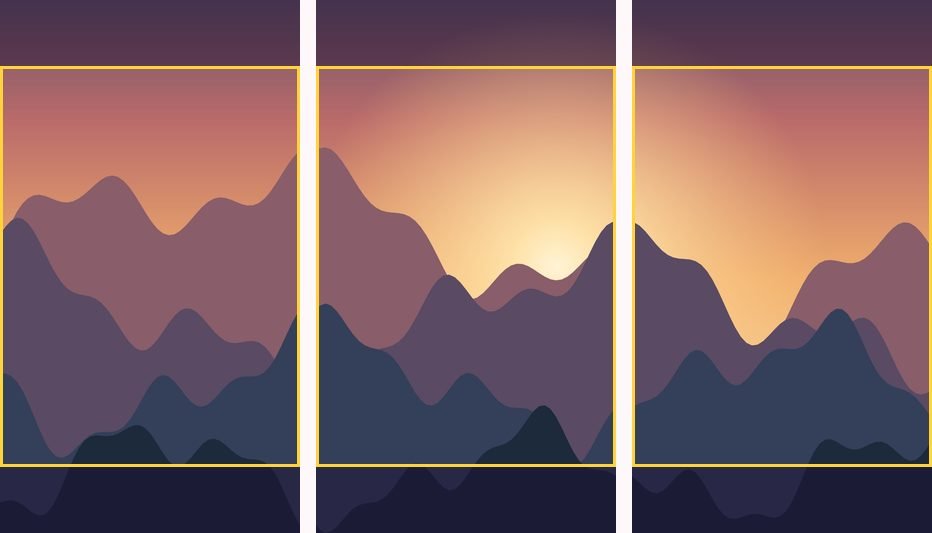
- Line it up Drag and zoom inside the frame. The yellow lines show where the three posts meet, so keep important details off them.
- Download the three images Each one is 1080 × 1920, the full TikTok size. The middle part of each image is what shows on your profile, and the striped areas above and below only appear when someone opens the post.
- Post them in order Post tiktok-01 (the right tile) first, then tiktok-02, then tiktok-03 (the left tile).
- Pin them in the same order Open each post, tap the three dots and choose Pin. Pin tiktok-01 first and tiktok-03 last. TikTok shows the most recently pinned post first, so the banner reads left to right.
Why the images are tall
TikTok posts fill the whole screen at 9:16, but the profile grid only shows a shorter crop from the middle of each one. If you made three short tiles, TikTok would stretch or pad them and the banner wouldn’t line up. This tool makes full-size 9:16 images and places your banner exactly in the part the profile shows. The rest of each image is filled with the parts of your picture just above and below, so the posts still look good when someone taps on them.
Check the crop on your own profile
TikTok doesn’t publish the exact shape of its profile thumbnails, and it has changed its layout before. The tool uses a 3:4 crop, which is what profiles show today. After you post, look at your profile. If the edges don’t quite meet, it’s usually because one post has a different cover. Open the post’s cover settings and make sure the full image is selected, not a zoomed-in part.
Tips for TikTok banners
- Keep it bold and simple. Profile thumbnails are small on phones. Big shapes, strong colours and a few large words read better than fine detail.
- Leave room for the labels. TikTok puts a “Pinned” label and a view count on the thumbnails, so keep text away from the very top and bottom of the visible area.
- Make the three posts worth watching. Pinned posts are often the first things new visitors open. Use them for your best introduction, not just the banner.
- Update it like a header. Unpin and replace the three posts when you change a campaign or theme. Your other posts stay where they are.
Posting on Instagram too?
The Instagram banner maker makes the same three-post strip sized for Instagram’s 3:4 profile grid. For a larger picture across several rows, use the Instagram grid maker, and for a moving version made from a video clip, try the Reel grid maker.
How we test this tool
Each export is measured to be exactly 1080 × 1920, and we check that the band TikTok shows on profiles runs straight across all three images with no jump at the cuts. TikTok doesn’t publish its profile thumbnail shape, so we say so plainly, use the 3:4 crop profiles show today, and keep it adjustable in case TikTok changes it. Our full process is on the how we test and write page.
Questions people ask
What size is a TikTok banner?
Three posts of 1080 × 1920 pixels each. The banner itself sits in the middle part of each post, which is the part TikTok shows on your profile.
How many posts can I pin on TikTok?
Up to three, which is why a TikTok banner is three posts wide.
In what order do I pin the posts?
Pin the right tile (tiktok-01) first and the left tile (tiktok-03) last. The newest pin appears first on the left.
Is the TikTok banner maker free?
Yes. There’s no sign-up or watermark, and the images are made in your browser without uploading anything.
Written and tested by Profile Grid Maker. Last updated October 22, 2026. How we test