How to make a moving Instagram grid from a video
A video grid is one clip split into several Reels that play side by side on your profile. When someone opens your profile, the tiles move together like one big screen. This video splitter makes the tiles for you as ready-to-post MP4 files, right in your browser.
- Pick a short clip Five to fifteen seconds is ideal. Slow movement, wide shots and simple backgrounds look best, because each tile is small on the profile.
- Choose the rows One row makes three Reels, which is the easiest to post. Two rows make six and three rows make nine.
- Frame the video Drag and zoom the still frame until the cuts fall in good places. The same framing is used for every frame of the clip.
- Make the videos Tap Make videos and keep the tab open. Your phone or computer builds each tile one frame at a time, so it takes a little while for longer clips. When it’s done, the ZIP downloads, and you can also save the videos one by one.
- Post them as Reels in order Start with reel-01, the bottom-right tile, and finish with the top-left one. Post them back to back so nothing else lands in between.
Why each tile is a full-size Reel
Reels are 1080 × 1920 pixels, but your profile grid only shows the middle 3:4 part of each one. This tool places your grid in exactly that part of every tile. The space above and below is filled with the part of your video just outside the tile, so each Reel still looks like a real video when someone opens it full screen.
When you upload each Reel, Instagram may ask you to adjust how it looks on your profile grid. Leave the crop in the middle, otherwise that tile shifts and the seams won’t meet.
About sound and covers
The videos are saved without sound. Many video grids work better silent, but if you want music, add the same song in Instagram to each Reel, or just to the first one.
The cover is the still image your profile shows before the grid plays. Instagram usually uses the first frame, which keeps all the tiles in sync. If it suggests a different cover, pick the first frame for every tile so the still version of your grid lines up too.
Tips for smooth video grids
- Start with a sharp, high-resolution clip. Each tile uses only part of the original frame, so a 4K clip looks much better than a 720p one.
- Keep the camera steady. Shaky footage is more noticeable when it’s split, because every tile moves at once.
- Use Chrome, Edge or Safari. They can make MP4 video files on your device. On an iPhone you need iOS 16.4 or newer.
- Leave the tab open. If you switch apps on a phone, the browser may pause the work. It continues when you come back.
- Trim first if needed. Clips longer than 30 seconds use only the first 30 seconds, so cut the part you want before uploading.
Photo grids and banners
If you’d rather start with a still image, the Instagram grid maker splits a photo into 3 to 30 posts. The banner maker makes a single row of three, and the TikTok banner maker does the same for TikTok.
How we test this tool
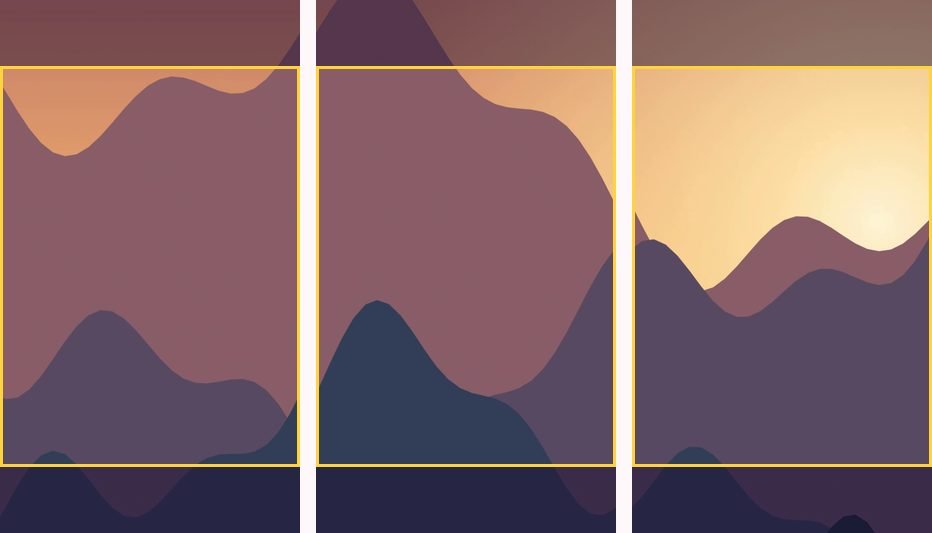
We open the finished files in a video inspector and check the size (1080 × 1920), the frame rate (30 fps), the length, and that no frames are missing. We also look at frames from neighbouring tiles side by side to make sure each one holds the right part of the clip. Making MP4 files depends on your browser’s built-in video encoder, which is why the tool tells you clearly when a browser can’t do it. Our full process is on the how we test and write page.
Questions people ask
Is my video uploaded anywhere?
No. The video is split and saved by your own browser. It never leaves your device.
What format are the videos?
MP4 (H.264), 1080 × 1920 at 30 frames per second, which Instagram and TikTok both accept as Reels.
Why is there no sound?
Each tile is saved silent so the grid works cleanly. You can add music to any Reel inside Instagram when you post it.
How long can my video be?
Up to 30 seconds. Longer clips use the first 30 seconds.
It says my browser can’t make videos. What now?
Open the page in Chrome, Edge or Safari. Older phones and some browsers can’t create MP4 files, even though they can play them.
Written and tested by Profile Grid Maker. Last updated October 22, 2026. How we test